
Typed Document
Remove All Complexities From Creating EDI Documents
Developers can now spend more of their time on the business rules and not on intricacies of dealing with EDI”
The tools and your support really make it easier for me to engage in re-writing our application hipaa process from a lot of code from another developer to a sustainable, clearer and logical code with RDPCrystal Typed Document and its extensibility – User
Typed Documents transforms EDI creation into a truly object-oriented experience, completely eliminating the complexity of traditional file mapping
Main Features
- Cut EDI development in half
- Use feature-rich objects like Typed5010Document and Typed4010Document
- Use high level segment objects like ISA, GS, ST, CLM, IEA (1096+ Typed Segments)
- Easily create loops and segments with a truly Object-Oriented paradigm
- Extensible model allows the creation of custom Typed EDI documents and segments
- Supports all 5010 HIPAA and all 4010 transactions sets
- Code is cleaner, more understandable and maintainable
Details
If you can instantiate an object and set its properties, you can build compliant HIPAA EDI documents. It is truly that simple. With Typed Documents—including Typed5010Document and Typed4010Document—developers can effortlessly generate complex EDI data while bypassing traditional syntax headaches entirely.
Streamline your workflow with comprehensive structural support: Typed5010Document covers all HIPAA transactions, while Typed4010Document fully supports the entire 4010 specification. Document creation is completely intuitive, leveraging a familiar, predictable loop structure. With dedicated objects for every single 4010 and 5010 segment—including ISA, GS, ST, PAT, and HI—you simply set your properties natively. The engine automatically handles the heavy lifting, translating your data into flawless, compliant EDI format during generation.
Avoid the Details of EDI formats
Eliminate compliance risks and manual formatting headaches. Typed Documents automatically manages intricate syntax details like empty trailing elements and empty trailing composite elements—the silent culprits behind costly file errors and rejections. By seamlessly injecting element, composite, and segment separators exactly where they belong, the engine guarantees a flawless, production-ready EDI document every single time
Avoid Worrying about ISA Segment Minimum and Maximum Length Requirements
The ISA interchange control header is the foundation of any X12 document, requiring a strict fixed-length format and precise metadata to guide EDI parsers. Even a single misaligned character here will cause catastrophic parsing failures downstream. Typed Documents eliminates this risk entirely. The engine automatically pads or trims your ISA element data to exact specification, ensuring absolute conformity to the X12 standard and guaranteed parsing success.
Auto Placement of Number of Segments, Transactions and Functional Headers
Forget about manually tracking segment counts. In the X12 standard, the SE trailer requires an exact count of all segments within that transaction—a tedious task prone to human error. Typed Documents handles this entirely in the background. The engine dynamically counts your segments and populates the SE segment automatically. Going a step further, it tracks and writes your total transaction and group metrics straight into the GE and IEA envelopes, guaranteeing structural integrity from top to bottom.
Typed Documents takes care of the following counting scenarios:
- Adding the correct number of segments in SE segments
- Adding the correct number of transactions in GE segments
- Adding the correct number of functional groups in IEA segments
The Code
Typed5010Document sampleEDIFile = new Typed5010Document();
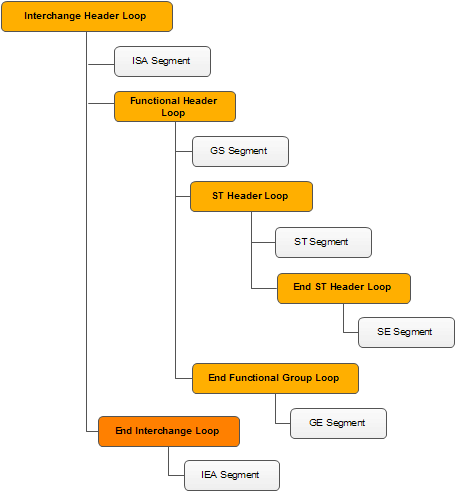
//Create an interchance loop. This loop will contain all other loops in the EDI structure
DocumentLoop interchangeHeader = sampleEDIFile.MainSection.CreateLoop("Interchange Header");
//Create an ISA segment in the interchange loopISA isa = interchangeHeader.CreateSegment();isa.AuthorizationInformationQualifier = "00";isa.AuthorizationInformation = "";
isa.SecurityInformationQualifier = "00";
isa.SecurityInformation = "";
isa.InterchangeIDQualifier1 = "ZZ";
isa.InterchangeSenderID = "InterchangeSenderID";
isa.InterchangeIDQualifier2 = "ZZ";
isa.InterchangeReceiverID = "InterchangeReceiverID";
isa.InterchangeDate = "150303";
isa.InterchangeTime = "1804";
isa.RepetitionSeparator = "^";
isa.InterchangeControlVersionNumber = "00501";
isa.InterchangeControlNumber = "1";
isa.AcknowledgmentRequested = "1";
isa.InterchangeUsageIndicator = "P";
isa.ComponentElementSeparator = ":";
//Now create the function header section
DocumentLoop functionalHeader = interchangeHeader.CreateLoop("Functional Header");
GS gs = functionalHeader.CreateSegment();
gs.FunctionalIdentifierCode = "HC";
gs.ApplicationSenderCode = "ApplicationSenderCode";
gs.ApplicationReceiverCode = "ApplicationReceiverCode";
gs.Date = "20150303";
gs.Time = "1424";
gs.GroupControlNumber = "1234";
gs.ResponsibleAgencyCode = "X";
gs.VersionReleaseIndustryIdentifierCode = "005010X222";
//Create a transaction header loop
DocumentLoop transactionHeader = functionalHeader.CreateLoop("Transaction Header");
ST st = transactionHeader.CreateSegment();
st.TransactionSetIdentifierCode = "837";
st.TransactionSetControlNumber = "1";
st.ImplementationConventionReference = "005010X222";
//Add an BHT segment to the transaction header loop
BHT bht = transactionHeader.CreateSegment();
bht.HierarchicalStructureCode = "0019";
bht.TransactionSetPurposeCode = "00";
bht.ReferenceIdentification = "44445";
bht.Date = "20040213";
bht.Time = "0345";
//Create the end of the transaction (SE segment). This must be done in a loop.
DocumentLoop endOfTransactionLoop = transactionHeader.CreateLoop("End Of Transaction");
SE se = endOfTransactionLoop.CreateSegment();
se.TransactionSetControlNumber = "1";
se.NumberOfIncludedSegments = "3";
//Create the end of the functional group (GE segment). This must be done in a loop.
DocumentLoop endOfFunctionalGroupLoop = functionalHeader.CreateLoop("End Functional Group");
GE ge = endOfFunctionalGroupLoop.CreateSegment();
ge.GroupControlNumber = "11234";
ge.NumberOfTransactionSetsIncluded = "1";
//Finally create the end of the interchange loop (IEA segment). This must be done in a loop.
DocumentLoop endInterchangeSection = interchangeHeader.CreateLoop("End Interchange");
IEA iea = endInterchangeSection.CreateSegment();
iea.InterchangeControlNumber = "123";
iea.NumberOfIncludedFunctionalGroups = "1";
//Generate the EDI file
string ediData= sampleEDIFile.ToEDIString(new Delimiters());
ISA*00**00**ZZ*InterchangeSenderID*ZZ*InterchangeReceiverID*150303*1804*^*00501*1*1*P*:~
GS*HC*ApplicationSenderCode*ApplicationReceiverCode*20150303*1424*1234*X*005010X222~
ST*837*1*005010X222~
BHT*0019*00*44445*20040213*0345~
SE*3*1~
GE*1*11234~
IEA*1*123~
public void DisplayAllClaims(List claims) {
   int rowNumber = 1;
   foreach (DocumentLoop claimSection in claims) {
      SBR subscriber = claimSection.GetSegment();
      DocumentLoop subscriberInfo = claimSection.GetLoop("2010BA");
      NM1 subName = subscriberInfo.GetSegment();

      DocumentLoop insuranceInfoSection = claimSection.GetLoop("2010BB");
      NM1 insuranceName = insuranceInfoSection.GetSegment();

      DataRow subInfoRow = subscriberTable.NewRow();
      subInfoRow[0] = rowNumber;
      subInfoRow[1] = subName.NameLastOrOrganizationName + " " + subName.FirstName;
      subInfoRow[2] = insuranceName.NameLastOrOrganizationName;
      subInfoRow[3] = subscriber.IndividualRelationshipCode;
      subInfoRow[4] = subscriber.ClaimFilingIndicatorCode;

      subscriberTable.Rows.Add(subInfoRow);

      List claimLoopSections = claimSection.GetLoops("2300");
      foreach (DocumentLoop cl in claimLoopSections) {
         CLM clm = cl.GetSegment();

         DataRow claimInfoRow = claimsTable.NewRow();
         claimInfoRow[0] = rowNumber;
         claimInfoRow[1] = clm.ClaimSubmitterIdentifier;
         claimInfoRow[2] = clm.MonetaryAmount;

         claimsTable.Rows.Add(claimInfoRow);

         List serviceLineSections = cl.GetLoops("2400");
         foreach (DocumentLoop sl in serviceLineSections) {
            //Get the service line segment
            SV1 sv1 = sl.GetSegment();

            DataRow serviceLineInfoRow = serviceLineTable.NewRow();
            serviceLineInfoRow[0] = rowNumber;
            serviceLineInfoRow[1] = sv1.CompositeMedicalProcedureIdentifier.ProductServiceID1;
            serviceLineInfoRow[2] = sv1.MonetaryAmount1;

            serviceLineTable.Rows.Add(serviceLineInfoRow);
          }
      }
     rowNumber++;
  }
}
Easily Extendable
Built with a highly extensible architecture, Typed Documents scales with your business needs. You can easily craft custom typed documents and specialized segments to support any custom or niche X12 standard. The framework provides the structural foundation, giving you the complete freedom to adapt, expand, and integrate without friction.
Example – Create a custom Typed Document with 3 custom segments
public class MyTypedDocument : TypedDocument {
   public MyTypedDocument() {
   }

   protected override DocumentSegment GetDocumentSegment(string segmentName) {
     switch (segmentName) {
       case "CS1": {
                return new CustomSegment1();
            }
       case "CS2": {
                return new CustomSegment2();
            }
       case "ABC": {
                return new CustomSegment3();
            }
      }
     return null;
    }
 }
Supported HIPAA Transactions (95+ Typed Segments)
- (837P) Health Care Claim: Professional
- (837I) Health Care Claim: Institutional
- (837D) Health Care Claim: Dental
- (820) Payroll Deducted/Group Premium Payment Ins. Products
- (820) Health Insurance Exchange Related Payments
- (834) Benefit Enrollment and Maintenance
- (835) Health Care Claim Advice
- (276) Health Care Claim Status Request
- (277) Health Care Claim Status Response
- (270) Health Care Claim Eligibility Request
- (271) Health Care Claim Eligibility Response
- (999) Implementation Acknowledgement
- (277 CA) Health Care Claim Acknowledgment
- (278) Health Care Services Review – Request for Review
- (278) Health Care Services Review – Response
Pingback: How Does the EDIValidator Work – RDPCrystal EDI Library
Pingback: Creating EDI data with TypedDocuments and .Net – RDPCrystal EDI Library
Pingback: Consuming EDI data with TypedDocuments and .Net – RDPCrystal EDI Library
Pingback: Fill PDF Forms with EDI data – RDPCrystal EDI Library
Pingback: Validating Typed Documents – RDPCrystal EDI Library