Parse, Load and Validate EDI Data
If you are creating or loading EDI data then the EDI Validator component alone is worth the price of the package
Streamline your workflow with high-speed, precision HIPAA EDI validation. Powered by the RDPScript EDI Language.
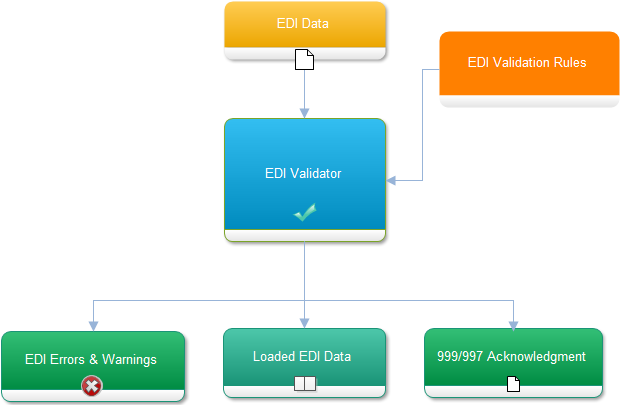
Validate and load raw EDI data into memory
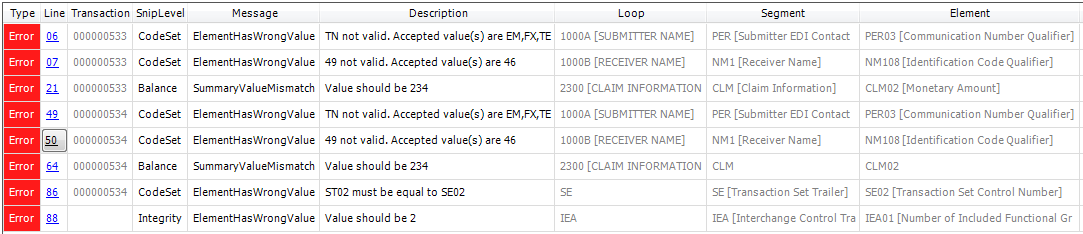
Errors And Warnings
SNIP Validation Levels ( 1-7 ) Support
Type 1: EDI Standards Integrity Testing
- Valid Segments
- Valid element data types
- X12 element syntax
- Semantic Rules
Data Formats
Ensure absolute data integrity with customizable, precision format validation. EDIValidator automatically screens elements for strict format compliance—instantly flag-raising warnings for mismatched dates, times, phone numbers, SSNs, EINs, country codes, or custom IDs. Going a step further, the engine features advanced conditional format validation. It dynamically evaluates data formats based on the values of surrounding elements within the same segment, perfectly handling complex, adaptive formatting rules without breaking a sweat
Custom data types can also be created using regular expressions
Minimum and Maximum Data Lengths
Protect your pipeline from costly disruptions. Element length violations—whether a value is too short or too long—are a primary cause of strict EDI file rejections. EDIValidator acts as your first line of defense, automatically scanning element lengths and raising instant warnings to catch compliance errors before they ever leave your system
Type 2: Implementation Guide Requirement Testing
- Repeat counts of segments and loops
- Used/Not Used, Recommended/Not Recommended segments/elements
- Valid code values
- Intra-segment testing
- HL parent/child relationships
- HL, LX, ENT sequences
Stop guessing where your data went wrong. When an incorrect value slips through, EDIValidator pinpoints the exact location of the error and instantly displays the expected, accepted values. It acts as an intelligent debugger for your EDI files, transforming cryptic validation errors into actionable, clear fixes.
Inter-Segment Rules (Self Rules)
Take control of complex, conditional schemas with Segment Self Rules. Traditional validation frameworks enforce element usage rigidly, completely ignoring the data context. EDIValidator shatters this limitation. With Self Rules, element requirements adapt dynamically based on actual data values within the same segment. Perfect for handling complex X12 scenarios like the NM1 segment, the engine automatically pivots its validation logic—instantly enforcing specific rules when an entity is a Person (e.g., requiring Element 3 while omitting 4 and 5) versus when it is a Company. It is context-aware validation at its finest.
Element Relationship Constraints Supported
Element Pairs
If a certain element is used then all elements in a specified group are required.
Example: P060708. If any of the elements 06, 07, or 08 are present, then all are required.
Required Data Element Pairs
At least one of the elements in a specified group is required.
Example: R0708R0910. At least one of element 07 and 08 is required, and at least one of
09 and 10 is required.
Conditional Data Element Pairs
If a certain element(s) is used then another specified element(s) is required.
Example: C0102. If element 1 is present then element 2 is required
List Conditional Pairs
If a certain element is used then at least one element from a specified group is required.
Example: L060810. If element 06 is present, then at least one of 08 or 10 is required.
Exclusion Data Element Pairs
Only one element in a specified group of elements can be used.
Example: E060810. Only one of 06, 08, or 10 may be present.
Engineered for unlimited flexibility, EDIValidator allows you to chain multiple relationship constraints together on a single segment. Developers can easily map, combine, and layer custom rules to match even the most intricate trading partner specifications. There are absolutely no boundaries—assign any number of relationship constraints to any segment to build a highly tailored, bulletproof validation engine
Line Counters
Automate line-counter verification without writing manual looping logic. In complex multi-instance loops—such as the LX segment in 837 healthcare claims—the X12 standard requires a tracking element to match the current repetition index exactly. EDIValidator handles this seamlessly in the background. The engine automatically calculates the exact iteration count, verifies it against the data element, and flags any discrepancies while explicitly displaying the expected sequential value
Equality Elements
Ensure absolute transactional integrity across your entire document. Equality Elements allow you to cross-reference data points between your header and footer segments, guaranteeing perfect symmetry. EDIValidator automatically verifies these values behind the scenes, catching critical structural mismatches instantly and ensuring your transaction data remains perfectly consistent from top to bottom.
Type 3: Implementation Guide Requirement Testing
- Balance fields testing
- Balancing for summary fields
Eliminate financial discrepancy risks with automated balance reconciliation. EDIValidator acts as a built-in auditor for your financial EDI payloads, calculating individual element values on the fly to verify that they perfectly match their corresponding summary totals. If total is miscalculated, the engine instantly flags the imbalance and explicitly displays the correct expected sum, making financial debugging completely stress-free.
Type 4: Inter-Segment Situation Testing
- For example, if segment 1 is present then segment 2 is required
Master complex data dependencies with a context-aware rules engine. EDIValidator goes far beyond static schema checking, allowing you to build deeply nested, conditional validation rules. The engine dynamically evaluates your payload on the fly—automatically adjusting segment usage, shifting accepted element values, and enforcing relational constraints based on the presence or value of preceding structures. It instantly flags out-of-order, prohibited, or missing loops, segments, and elements, keeping your complex data streams completely compliant.
EDI rules are a very powerful feature of the EDIValidator. Rules can be used in the following way, for example:
- If segment 23 element 2’s value is NOT EQUAL to 18 then segment 149 element 2 usage is REQUIRED else NOT USED
- If segment 23 element 2’s value is EQUAL to 18 or 19 then segment 149 element 2 accepted values are 2,3,4,5,6 else the default accepted values are 7,8,9,10
Condition operators include: EXISTS, NOT EXISTS, LESS THAN, LESS THAN OR EQUAL TO, GREATER THAN, GREATER THAN OR EQUAL TO, EQUAL TO.
Type 5: External Code Set Testing
- Ability to test for code values. For example, ICD, CPT, Zip Codes, States, etc
Extend your data verification directly into the file system with high-performance external code-list lookup. EDIValidator empowers you to cross-reference data elements against massive external reference databases—instantly validating zip codes, states, CAS registries, or crucial healthcare code sets like CPT, ICD, and NDC. Keep your system lightweight and modular by storing these lists inside your core rules file or as separate external assets. The engine gives you absolute freedom to build, import, and enforce custom code registries tailored perfectly to your business requirements.
Type 6: Product Type and Type of Service Testing
- Ensures that the segments (records) of data that differ based on certain healthcare services are properly created and processed into claims data formats
Type 7: Trading Partner Specific Testing
- The Implementation Guides contain some HIPAA requirements that are specific to Medicare, Medicaid, and Indian Health. Compliance or testing with these payer specific requirements is not required from all trading partners. If the trading partner candidate intends to exchange transactions with one of these Implementation Guide special payers, Type 7 testing is required
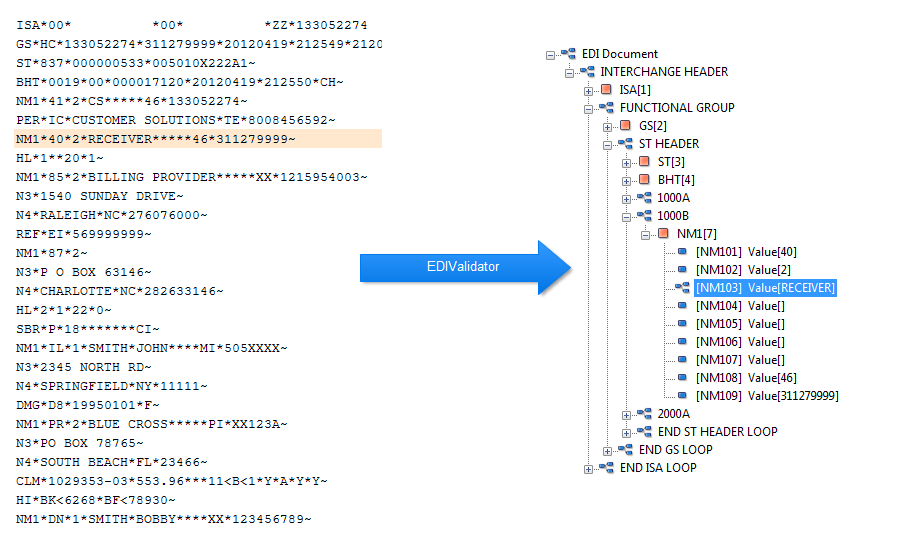
EDI Data is loaded after validation
Once validation is complete, EDIValidator instantly assembles all your data into a fully populated, production-ready EDI document. This structured object model is optimized for immediate application consumption, making it effortless to bind data directly to user interfaces, feed downstream analytics, or trigger automated workflows without a single extra parsing step.
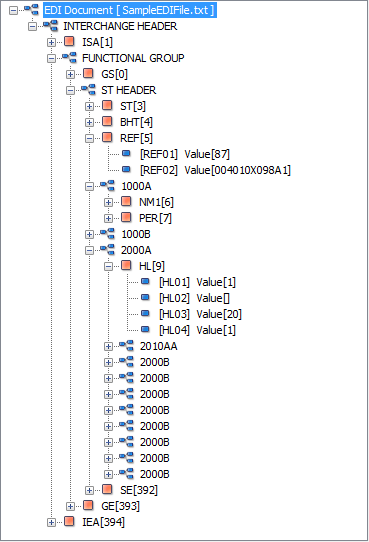
Access EDI data with an API
Interact with your validated EDI data through a native, intuitive API. Instead of parsing messy, raw text files, EDIValidator structures your data into an elegant, hierarchical tree. Developers can effortlessly navigate, traverse, and extract specific values using powerful, expressive methods like GetLoop('loopname'), GetSegment('SEG'), GetLastLoop(), and collection-retrieval methods like GetLoopCollection('LoopName') and GetSegmentCollection('REF'). It transforms raw EDI strings into developer-friendly objects instantly.
RDPScript Language
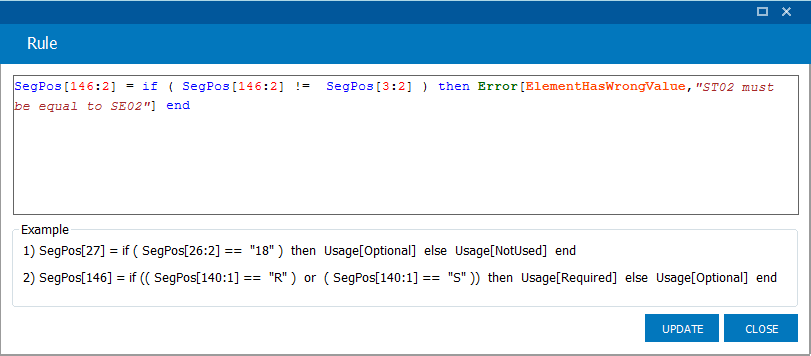
Create your own validation rules with RDPScript
Engineered for ultimate flexibility, RDPScript allows you to write powerful, custom validation rules using a highly intuitive scripting language. You can easily enforce complex business logic and unique partner constraints without cluttering your core codebase, making your validation engine incredibly adaptable.
Segment Usage
+SegPos[27] = if (SegPos[26:2] == "18") then Usage[Optional] else Usage[NotUsed] end
+SegPos[322] = if ((SegPos[316:1] == "R") or (SegPos[316:1] == "S")) then Usage[Required] else Usage[Optional] end
Custom Errors
+SegPos[135:5] = if (SegPos[135:5] == SegPos[40:5:1]) then Error[ElementHasWrongValue,"SV105 must be different from 2300 CLM05-01"] end
Accepted Values
+SegPos[3:2] = if ( SegPos[3:1] == "837" ) then LocalCode["val1","val2"] end
Use .Net for custom validation with Code Conditions
Unleash the full potential of your existing stack with Code Conditions. By anchoring into the power of .NET, EDIValidator triggers dynamic events during processing, giving you the complete freedom to execute custom validation logic natively in C# or VB.NET
+SegPos[277:2] = if ( CodeCondition["shouldStartWithZeros"] ) then Error[ElementHasWrongValue,"Yeah, It Works"] end
if (e.CodeCondition.Id == "shouldStartWithZeros"){if (e.CurrentSegment.Elements[1].DataValue.StartsWith("0000")){e.ConditionValid = true;}}}
Creating validation rules is simple